Saturday, February 20, 2016

The Cause and Effect of Java Generics Wildcard

IS-A Relationship

In object-oriented programming, IS-A relationship is as common as breathing for programmers. See the class hierarchy diagram below.

diagram 1: IS-A relationship

Nothing much to say and the code line in diagram 1 above is 100% valid because Phone IS A Device. When the classes above become type argument of parameterized type (e.g, List<Phone>, List<Device>, List<Camera> in diagram 2 below), the IS-A relationship is still applied to determine what type of object can be set/put into the object with parameterized type.

diagram 2: Type argument determines what object can be accepted

Common Misunderstanding

However, when looking into the relationship of the List<Phone>, List<Device>, List<Camera> we always subconsciously think that List<Device> is the parent of List<Phone> and List<Camera>. This is not true. In fact, three of them are referring to the same class, List. In the List class hierarchy the type Device, Phone and Camera don't even exist. 

This is the very common misunderstanding in Java Generics yet the important concept to learn. You have to aware that the code such as the code line in diagram 3 below is invalid due to incompatible type compilation error.
diagram 3: Common misunderstanding

Wildcard

Is that means they do not have a relationship at all? Not really, they do have a relationship indirectly. Thanks to the Wildcard(appears as ?) which make this relationship happen. In short,
  • The wildcard is a special kind of type argument with unknown type,
  • The wildcard type (e.g. List<?>) is type-safe guaranteed by Java compiler like other parameterized type,
  • The wildcard type is an abstract parameterized type. The actual parameterized type of a wildcard typed variable could be any other normal parameterized type. See the code line in diagram 4 below. The actual type of list variable is List<Phone>.

diagram 4: Common parent of parameterized types

In general, three of them are having the same parent which is List<?>.

This is not the end of the story. Besides unbounded wildcard type as you have seen in diagram 4, the wildcard type can also appear in 2 other forms, upper-bounded wildcard type (<? extends ...>), and lower-bounded wildcard type (<? super ...>). This makes the wildcard types hierarchy (diagram 5) even more interesting.

diagram 5: Wildcard types hierarchy

Upper-bounded Wildcard Type

The upper-bounded wildcard type hierarchy could be illustrated in the following diagram 6.

diagram 6: Upper-bounded wildcard type hierarchy
Take a look at the List<? extends Phone>. This wildcard type basically claims that "whichever List with type argument IS A Phone is under my territory". In other words, any List with type argument IS A Phone become a subtype of List<? extends Phone>.

If we look at the List<? extends Device>, not only the actual parameterized type List<Phone>, List<Camera> and List<Device>, the abstract parameterized type List<? extends Phone> and List<? extends Camera> also is its subtypes. Because all of their type argument IS A Device.

The assignment statements in the following code snippet are all valid.

List<Phone> phones = new ArrayList<>();
List<Camera> cameras = new ArrayList<>();
List<Device> devices = new ArrayList<>();

List<? extends Phone> phonesWildcard;
List<? extends Camera> cameraWildcard;
List<? extends Device> deviceWildcard;

// Assignments

phonesWildcard = phones;
cameraWildcard = cameras;

deviceWildcard = devices;
deviceWildcard = phones;
deviceWildcard = cameras;
deviceWildcard = phonesWildcard;
deviceWildcard = cameraWildcard;

Now, let's recap what does the actual parameterized type could contain. This is important because together the type-safe principle, they make up the upper-bounded wildcard type characteristics. See diagram 7 below.

diagram 7: What makes up upper-bounded wildcard type characteristics

Question 1: What type of object is eligible to be put into List<? extends Device>?

The answer is none. The actual parameterized type of List<? extends Device> is not clear-cut. We never know if its actual parameterized type is List<Phone>, List<Camera> or List<Device>. See the following code snippet.

List<Phone> phones = new ArrayList<>();
phones.add(new Phone());

List<? extends Device> deviceWildcard;
deviceWildcard = phones; // The actual type is List<Phone> that contains Phone object

deviceWildcard.add(new Camera()); // break type-safe. Compilation error!

The actual parameterized type of deviceWildcard above is List<Phone>. Although Camera is a Device, putting it into deviceWildcard breaks the type-safe principle. Java compiler will make sure we get a compilation error for that.

Question 2: What type of object can be retrieved from List<? extends Device>?

The answer is Device. Look at the content object of all the actual parameterized type covered under List<? extends Device> in diagram 7, they have one common fact - they are having the same parent, Device. This means it is safe to assume that whatever object get from the List<? extends Device> is definitely IS A Device.

List<Phone> phones = new ArrayList<>();
phones.add(new Phone());

List<? extends Device> deviceWildcard;
deviceWildcard = phones; // The actual type is List<Phone> that contains Phone object
        
Device device = deviceWildcard.get(0); // OK. Phone is a Device

Example of using Upper-bounded Wildcard Type

If you wonder how could the upper-bounded wildcard type help, here is an example. Given the Device classes below (well, the methods implementation are not important.)

public class Device {
    
    public void on() {...}
    
    public void off() {...}
}

public class Phone extends Device {
    
    public void call() {...}
}

public class Camera extends Device {
    
    public void shootPhoto() {...}
}

Every device can be on() and off(). Now, we need a method to test every device simply by turning it on then off.

public static void testDevices(List<Device> devices) {
    for (Device device : devices) {
        device.on();
        device.off();
    }
}

public static void main(String[] args) {

    List<Device> devices = new ArrayList<>();
    devices.add(new Phone());
    devices.add(new Camera());
    testDevices(devices); // OK
}

The codes above are valid and works fine. We can test a devices list which its content objects could be Phone or Camera typed. Now, how about if we pass phones list or cameras list to the testDevices() method as below?

List<Phone> phones = new ArrayList<>();
phones.add(new Phone());
testDevices(phones); // Compilation error! Incompatible types.

List<Camera> cameras = new ArrayList<>();
cameras.add(new Camera());
testDevices(cameras); // Compilation error! Incompatible types.

Logically, testDevices() should able to accept phones and cameras list. After all, Phone and Camera are Device which can be turned on() and off(). However, from the code, Java Compiler is expecting the actual parameterized type with type argument Device. This restriction causing phones and cameras which logically should be accepted by testDevices() become compilation errors.

In this case, we can use the upper-bounded wildcard type to loose the type restriction. See the following updated testDevices() below.

public static void testDevice(List<? extends Device> devices) {
    for (Device device : devices) {
        device.on();
        device.off();
    }
}

The method parameter becomes an abstract parameterized type and able to accept actual parameterized type as long as its type argument IS A Device.

Lower-bounded Wildcard Type

The lower-bounded wildcard type hierarchy could be illustrated in the following diagram 8.

diagram 8: Lower-bounded wildcard type hierarchy
First, we look at the List<? super Device>. This wildcard type basically claims that "whichever List with type argument IS A Device or Super-type of Device is under my territory". Well, from the Devices class hierarchy, only the Device meets this acceptance criteria, hence only List<Device> is a subtype of List<? super Device>.

If we look at the List<? super Phone>, this time, the actual parameterized type List<Phone> and List<Device> as well as the abstract parameterized type List<? super Device> meet the acceptance criteria and hence, they are subtypes of List<? super Phone>.

The assignment statements in the following code snippet are all valid.

List<Phone> phones = new ArrayList<>();
List<Camera> cameras = new ArrayList<>();
List<Device> devices = new ArrayList<>();

List<? super Phone> phonesWildcard;
List<? super Camera> cameraWildcard;
List<? super Device> deviceWildcard;

// Assignments
deviceWildcard = devices;

phonesWildcard = phones;
phonesWildcard = devices;
phonesWildcard = deviceWildcard;

cameraWildcard = cameras;
phonesWildcard = devices;
cameraWildcard = deviceWildcard;

Again, let's recap what does the actual type could contain. This is important because together the type-safe principle, they make up the lower-bounded wildcard type characteristics. See diagram 9 below.
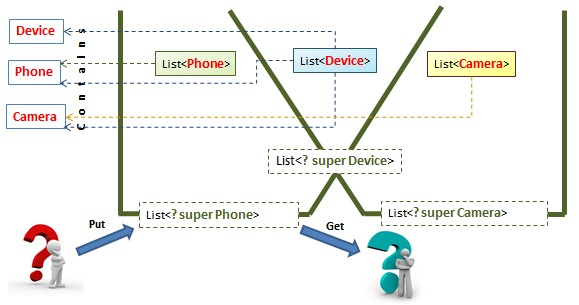
diagram 9: What makes up lower-bounded wildcard type characteristics

Question 1: What type of object is eligible to be put into List<? super Phone>?

The answer is any object that IS A Phone. Refer to diagram 9, the actual parameterized type for List<? super Phone> is List<Phone> and List<Device>. Both can definitely keep any object that IS A Phone.

Question 2: What type of object can be retrieved from List<? super Phone>?

The answer is the highest type - Object. This is because the actual parameterized type of List<? super Phone> is not clear-cut. It could be List<Phone> or List<Device>. Whereby the List<Device> could contain an object with type other than Phone. See the following code snippet.

List<Device> devices = new ArrayList<>();
devices.add(new Camera()); // devices list that contains Camera object

List<? super Phone> phonesWildcard;
phonesWildcard = devices;

Phone phone = phonesWildcard.get(0); // Compilation error! Incompatible types.

phonesWildcard never able to confirm whether its content object is a Phone. Doing that will get a compilation error. Therefore, the safest way is to return the highest type - Object.

Example of using Lower-bounded Wildcard Type

If you also wonder how could the lower-bounded wildcard help, here is an example. Let's say we need respective methods to create and test a specific device 's functionality then put it into the given List parameter.

public static void packPhone(List<Phone> phones) {
    Phone phone = new Phone();
    phone.call(); // test Phone functionality
    phones.add(phone); // put Phone into given list
}

public static void packCamera(List<Camera> cameras) {
    Camera camera = new Camera();
    camera.shootPhoto(); // test Camera functionality
    cameras.add(camera); // Put Camera into given list
}

public static void main(String[] args) {

    List<Phone> phonesList = new ArrayList<>();
    packPhone(phonesList);

    List<Camera> camerasList = new ArrayList<>();
    packCamera(camerasList);
}

The codes above are valid and works fine. Now, how about if we have a devices list that would like to pack Phone and Camera?

List<Device> devicesList = new ArrayList<>();
packPhone(devicesList); // Compilation error! incompatible types.
packCamera(devicesList); // Compilation error! incompatible types.

By right, we can put Phone and Camera object into devicesList. However, from the code, Java Compiler is expecting the actual parameterized type with type argument Phone for packPhone() and Camera for packCamera(). This restriction makes both methods can't accept deviceList.

In this case, we can use the lower-bounded wildcard type to loose the type restriction. See the following updated packPhone() and packCamera() below.

public static void packPhone(List<? super Phone> phonesWildcard) {
    Phone phone = new Phone();
    phone.call(); // test Phone functionality
    phonesWildcard.add(phone); // put Phone into given list
}

public static void packCamera(List<? super Camera> camerasWildcard) {
    Camera camera = new Camera();
    camera.shootPhoto(); // test Camera functionality
    camerasWildcard.add(camera); // Put Camera into given list
}

The method parameter becomes an abstract parameterized type and able to accept the parameterized type as long as its type argument IS A super-type of Phone and Camera respectively.

Unbounded Wildcard Type

The unbounded wildcard type is an abstract parameterized type and the common parent of all parameterized type, either actual or abstract. It could contain a object of any type (like List<Object>); the actual parameterized type that it referencing to is never clear-cut (like List raw type). However, it is loose restriction compare to the actual parameterized type List<Object> and type-safe compare to raw type List.

Example of using Unbounded Wildcard Type

If you also wonder how could the unbounded wildcard help, here is an example. Let's say we want to compare two devices lists to check if they are holding the same quantity.

public static boolean isContainSameQuantity(List<Device> list1, List<Device> list2) {
    return list1.size() == list2.size();
}

public static void main(String[] args) {
    List<Device> devices1 = new ArrayList<>();
    List<Device> devices2 = new ArrayList<>();

    isContainSameQuantity(devices1, devices2);
}

The codes above are valid and works fine. Now, how about if we want the comparison happen between list with different types?

List<Phone> phones = new ArrayList<>();
List<Camera> cameras = new ArrayList<>();
List<Device> devices = new ArrayList<>();

isContainSameQuantity(phones, cameras); // Compilation error! Incompatible type.
isContainSameQuantity(phones, devices); // Compilation error! Incompatible type.
isContainSameQuantity(devices, cameras); // Compilation error! Incompatible type.

Java Compiler will not let us to do so as it so concern about the type argument, Device that has been assigned to the method parameters of isContainSameQuantity(). In fact, the isContainSameQuantity() implementation does not deal with the object with its type is genericized in List generic type at all. Therefore, we can use unbounded wildcard type to loose the restriction to the max. See the following update version of isContainSameQuantity().

public static boolean isContainSameQuantity(List<?> list1, List<?> list2) {
    return list1.size() == list2.size();
}

public static void main(String[] args) {
    List<Phone> phones = new ArrayList<>();
    List<Camera> cameras = new ArrayList<>();
    List<Device> devices = new ArrayList<>();

    isContainSameQuantity(phones, cameras); // OK
    isContainSameQuantity(phones, devices); // OK
    isContainSameQuantity(devices, cameras); // OK
}

Summary

Wildcard type helps us to make our code type-safe yet flexible. It could be a hard time to pick up this tool but once you familiar with it, it will become a great tool in your hand. Below is the summary of when I should use which wildcard form. Hope it helps.

Upper-bound Wildcard Type <? extend ...>
  • All I need is to get a specific type of objects from a generic typed object and I never need to put an object into it.
Lower-bounded Wildcard Type <? super ...>
  • All I need is to put a specific type of objects into a generic typed object and I am aware that it will only return the object with the Object type. I take the risk to cast the return object to a specific class.
Unbounded Wildcard Type <?>
  • I will not deal with the object with its type is genericized in the generic typed object. And I am aware that it will only return the object with the Object type. I take the risk to cast the return object to a specific class.

References:
https://docs.oracle.com/javase/tutorial/java/generics/wildcards.html
Book: Effective Java 2nd Edition by Joshua Blosh - Item 28

Sunday, January 3, 2016

Annotation processing during compilation time: Generating source code

Annotation processor is able to generate additional files including new Java source file during annotation processing at compile time. Moreover, this newly generated Java source file will also get compiled in the same compilation unit.

This post shows you a working example of annotation processor which able to create a new POJO class for the class field that annotated with @Pojo annotation without a programmer has to write this class explicitly. This post focuses on source code implementation. For projects structure and how to register an annotation processor, please refer to my other post, Annotation Processing: Register Annotation Processor.

Annotation Type:

Firstly, we need a project that contains the custom annotation type as below:

@Target(ElementType.FIELD) // Target to field element only
@Retention(RetentionPolicy.SOURCE) // Source level retention policy
public @interface Pojo {
    
    /**
     * The types of the fields in this POJO class. 
     * Each type has a corresponding name specified in 'fieldNames' attribute.
     */
    Class[] fieldTypes() default {};
    
    /**
     * The names of the fields in this POJO class. 
     * Each name has a corresponding type specified in 'fieldTypes' attribute.
     */
    String[] fieldNames() default {};
}

The @Pojo annotation with the Pojo annotation type above has the following characteristics:
  • It can only be applied to the field declaration in a class. Applying it on to other declaration will get a compilation error. "annotation type not applicable to this kind of declaration"
  • It compiles the source code level retention policy. This means that the @Pojo annotation (which applied in the application source code) information will be discarded after the source code compilation. Well, this retention policy is all we need for the source code generation example in this post.
  • It has 2 annotation attributes. The fieldTypes is expecting an array of Class elements; the fieldNames is expecting an array of String elements. Both elements at the same element index are information mandatory for constructing a field in the to be created POJO class. Therefore, both array size must be the same and String element value must not be an empty string.

Application

This is the class in another project where we apply the @Pojo annotation.

package com.hauchee.application; // PackageElement

import com.hauchee.annotation.Pojo;

public class Application { // TypeElement
    
    private String id; // VariableElement
    
    @Pojo( // AnnotationMirror
        // ExecutableElement:AnnotationValue pairs    
        fieldNames = {"name", "price"}, 
        fieldTypes = {String.class, Double.class}
    )
    private Game game; // VariableElement

    public Application(String id, Game game) { // ExecutableElement
        this.id = id;
        this.game = game;
    }

    public String getId() { // ExecutableElement
        return id;
    }

    public Game getGame() { // ExecutableElement
        return game;
    }
}

When the annotation processing takes place, the annotation processor sees the Application source above as an element tree below:


By the way, the Game class of the game field does not exist. By applying the @Pojo annotation with the field information, this allows annotation processor to generate the POJO class for Game.

Annotation Processor

Now is the time to implement the annotation processor to process the field that annotated with @Pojo annotation. Let's start with the skeleton as below:

Annotation processor skeleton:

@AutoService(Processor.class)
@SupportedSourceVersion(SourceVersion.RELEASE_7)
@SupportedAnnotationTypes("com.hauchee.annotation.Pojo")
public class PojoProcessor extends AbstractProcessor {

    private Elements elementsUtil;
    private Filer filer;
    private Messager messager;
    
    @Override
    public synchronized void init(ProcessingEnvironment processingEnv) {
        super.init(processingEnv);
        elementsUtil = processingEnv.getElementUtils();
        filer = processingEnv.getFiler();
        messager = processingEnv.getMessager();
    }

    @Override
    public boolean process(Set<? extends TypeElement> annotations,
            RoundEnvironment roundEnv) {
        
        // Continue to get the involved elements. Refer to next section.
        return true;
    }

    private void error(VariableElement varElement,AnnotationMirror annotationMirror,
            String message) {
        messager.printMessage(Diagnostic.Kind.ERROR, message, varElement, annotationMirror);
    }
}

We create a new annotation processor named PojoProcessor by extending the javax.annotation.processing.AbstractProcessor. This new annotation processor has to be registered as a service so that it is recognizable by the Annotation Processing Tool (APT). This can be done in a conventional way but in this example, I make use of Google auto-service @AutoService which make the registration much easier. For more detail, please read the Annotation Processing: Register Annotation Processor.

Once the annotation processor is registered successfully, it is initialized (where its init() method is called) by the APT and stay in standby mode during compilation time. In this example, the init() method is overridden in order to collect all necessary utility classes.
  • Elements: An utility class for operating on elements. In this example, we use this class to retrieve the element that we want.
  • Filer: The filer is used to create new source, class, or auxiliary files. In this example, we use filer to generate new Java source files.
  • Messager: The messager is used to report errors, warnings, and other notices. In this example, we use messager (in the error() method) to report validation errors. This will then provide hints to the IDE to react on those errors. For more detial, please read the Annotation Processing: Error Handling
  • Types: An utility class for operating on types. Not use in this example
When the PojoProcessor start processing? In another words, when its process() method is executed? At compile time, if the APT scanned and detected the @Pojo annotation used in a class (in this case, the Application field), it will invoke the process() method of the PojoProcessor which has declared itself to support the Pojo annotation type in @SupportedAnnotationType.

Getting the involved elements

Coming up the implementation in process() method shows how to retrieve the highlighted elements below. Those are elements required in this example for error reporting as well as source code generation.

@Override
public boolean process(Set<? extends TypeElement> annotations,
        RoundEnvironment roundEnv) {

    // The variable element which annotated with @Pojo annotation.
    VariableElement varElement = null;

    // The @Pojo annotation element.
    AnnotationMirror annotationMirror = null;

    try {
        // This returns the variable element that annotated with @Pojo annotation.
        for (Element annotatedElement : roundEnv.getElementsAnnotatedWith(Pojo.class)) {
            varElement = (VariableElement) annotatedElement;

            // Getting all the annotation elements from the variable element.
            List<? extends AnnotationMirror> allAnnotationMirrors
                    = varElement.getAnnotationMirrors();
            for (AnnotationMirror aAnnotationMirror : allAnnotationMirrors) {

                // Make sure the annotation element is belong to Pojo annotation type.
                if (aAnnotationMirror.getAnnotationType().toString()
                        .equals(Pojo.class.getName())) {

                    // Found the @Pojo annotation element.
                    annotationMirror = aAnnotationMirror;

                    // Getting the annotation element values from the @Pojo annotation element.
                    Map<? extends ExecutableElement, ? extends AnnotationValue> elementValues
                            = annotationMirror.getElementValues();
                    
                    // Continue to get the annotation values. Refer to next section.
                    break;

                }
            }

        }
    } catch (ProcessingException e) {
        error(varElement, annotationMirror, e.getMessage());
    } catch (IOException e) {
        error(null, null, e.getMessage());
    }

    return true;
}

Getting and validating the annotation values

After we have obtained the annotation element values, next is to extract the values from these elements. This could be fairly simple if the annotation element types are primitive types. But it become tricky when it involves Class type. For more detail, please read Annotation Processing: Getting Class annotation value.

In this example, I have implemented an annotation value visitor to help the PojoProcessor to extract the values.

class PojoAnnotationValueVisitor extends SimpleAnnotationValueVisitor7<Void, String> {

    private final List<TypeName> fieldTypes = new ArrayList<>();
    private final List<String> fieldNames = new ArrayList<>();

    // Only need to override the visitArray() method because both 'fieldTypes' and
    // 'fieldNames' are array.
    @Override
    public Void visitArray(List<? extends AnnotationValue> vals, String elementName) {
        for (AnnotationValue val : vals) {
            Object value = val.getValue();
            switch (elementName) {
                case "fieldTypes":
                    fieldTypes.add(TypeName.get((TypeMirror) value));
                    break;
                case "fieldNames":
                    fieldNames.add((String) value);
                    break;
            }
        }

        return null;
    }

    void validateValues() throws ProcessingException {
        if (fieldNames.size() != fieldTypes.size()) {
            throw new ProcessingException(
                    "The length of 'fieldNames' must be same as the length of 'fieldTypes'.");
        }
        validateEmptyElement(fieldNames, "fieldNames");
    }

    private void validateEmptyElement(List<String> elements, String name)
            throws ProcessingException {
        
        int i = 0;
        for (String fieldName : elements) {
            if (fieldName.trim().isEmpty()) {
                throw new ProcessingException(
                        "\"%s\" with element index \"%d\" must not be an empty String.", name, i);
            }
            i++;
        }
    }

    public List<TypeName> getFieldTypes() {
        return fieldTypes;
    }

    public List<String> getFieldNames() {
        return fieldNames;
    }
}

The PojoAnnotationValueVisitor class above extends SimpleAnnotationValueVisitor7. The number "7" at the back indicating it complies with RELEASE_7 source version which is same as the @SupportedSourceVersion defined in the PojoProcessor.

This visitor also helps in validating the annotation values. It will throw checked ProcessingException (as below) if the annotation value is invalid. The validation shown in this visitor could be better but let's just live with the simple validation checking.

class ProcessingException extends Exception {

    public ProcessingException(String msg, Object... args) {
        super(String.format(msg, args));
    }
}

Now, let's make use of the visitor in PojoProcessor.

@Override
public boolean process(Set<? extends TypeElement> annotations,
        RoundEnvironment roundEnv) {

    ...

    // Create a visitor instance.
    PojoAnnotationValueVisitor visitor = new PojoAnnotationValueVisitor();

    // Getting annotation element values from the @Pojo element.
    Map<? extends ExecutableElement, ? extends AnnotationValue> elementValues
            = annotationMirror.getElementValues();
    for (Map.Entry<? extends ExecutableElement, ? extends AnnotationValue> entry
    	: elementValues.entrySet()) {

        // The 'entry.getKey()' here is the annotation attribute name.
        String key = entry.getKey().getSimpleName().toString(); 

        // The 'entry.getValue()' here is the annotation value which could accept a visitor.
        entry.getValue().accept(visitor, key);
    }

    visitor.validateValues(); // Throw ProcessingException if annotation value is invalid.

    ...
}

Generating new source code

Once we get the valid annotation values, next thing is to process those values and generate the new source file. Basically, Filer is able to open an OutputStream and we could just construct the new source code content in Strings and write them into this OutputStream. However, there is a more structural and organized approach to achieve the same thing by making use of third party JavaPoet. In this example, I have implemented a PojoSourceCodeBuilder to helps PojoProcessor to build the Java source content.

class PojoSourceCodeBuilder {
    
    private final Filer filer;
    private final String packageName;
    private final List<FieldSpec> fieldSpecs;
    private final List<MethodSpec> methodSpecs;
    
    public PojoSourceCodeBuilder(Filer filer, PackageElement pkgElement) {
        this.filer = filer;
        this.packageName = pkgElement.isUnnamed()
                ? null : pkgElement.getQualifiedName().toString();
        this.fieldSpecs = new ArrayList<>();
        this.methodSpecs = new ArrayList<>();
    }

    private void addGetterSetterMethods(String fieldName, TypeName fieldType) {
        String nameForGetterSetter
                = fieldName.substring(0, 1).toUpperCase() + fieldName.substring(1);         

        /** Getter method spec. **/
        methodSpecs.add(MethodSpec.methodBuilder("get" + nameForGetterSetter)
                .addModifiers(Modifier.PUBLIC)
                .addStatement("return " + fieldName)
                .returns(fieldType).build());

        /** Setter method spec. **/
        methodSpecs.add(MethodSpec.methodBuilder("set" + nameForGetterSetter)
                .addModifiers(Modifier.PUBLIC)
                .addParameter(fieldType, fieldName, Modifier.FINAL)
                .addStatement("this." + fieldName + " = " + fieldName)
                .returns(TypeName.VOID).build());
    }
    
    public PojoSourceCodeBuilder addFieldWithGetterSetter(String fieldName, TypeName fieldType) {
        fieldSpecs.add(FieldSpec.builder(fieldType, fieldName, Modifier.PRIVATE).build());
        addGetterSetterMethods(fieldName, fieldType);
        return this;
    }
    
    public void writeToJavaFile(String className) throws IOException {
        TypeSpec typeSpec = TypeSpec.classBuilder(className).addFields(fieldSpecs)
                .addModifiers(Modifier.PUBLIC)
                .addMethods(methodSpecs).build();
        JavaFile.builder(packageName, typeSpec).build().writeTo(filer);
    }
}

Now, let's make use of the source code builder in PojoProcessor.

@Override
public boolean process(Set<? extends TypeElement> annotations,
        RoundEnvironment roundEnv) {

    ...

    visitor.validateValues();
    buildPojoClass(varElement, visitor);
    break;

    ...
}

private void buildPojoClass(
        VariableElement varElement, PojoAnnotationValueVisitor visitor)
        throws IOException {

    List<String> fieldNames = visitor.getFieldNames();
    List<TypeName> fieldTypes = visitor.getFieldTypes();

    PackageElement pkgElement = elementsUtil.getPackageOf(varElement.getEnclosingElement());

    // Create a source code builder instance.
    PojoSourceCodeBuilder sourceCodeBuilder = new PojoSourceCodeBuilder(filer, pkgElement);

    // Process the field names and types.
    for (int i = 0; i < fieldTypes.size(); i++) {
        TypeName fieldType = fieldTypes.get(i);
        String fieldName = fieldNames.get(i);

        sourceCodeBuilder.addFieldWithGetterSetter(fieldName, fieldType);
    }

    // Write to the new Java source file.
    sourceCodeBuilder.writeToJavaFile(varElement.asType().toString());
}

Great! We are all set now. Build the projects in the following sequence.
  1. Annotation
  2. Annotation Processor
  3. Application
Previously, without the annotation processor, building the Application project will get "cannot find symbol" compile error at the line where Game type is used. Now, building the Application project with the annotation processor is succesful and the Game source file is automatically generated.

public class Game {

    private String name;

    private Double price;

    public String getName() {
        return name;
    }

    public void setName(final String name) {
        this.name = name;
    }

    public Double getPrice() {
        return price;
    }

    public void setPrice(final Double price) {
        this.price = price;
    }
}

Processing round

The same process() method could be called more than 1 time. The official javadoc define processing like as follows:

Annotation processing happens in a sequence of rounds. On each round, a processor may be asked to process a subset of the annotations found on the source and class files produced by a prior round. The inputs to the first round of processing are the initial inputs to a run of the tool; these initial inputs can be regarded as the output of a virtual zeroth round of processing.

To stick with our Pojo example, in the situation where the newly generated source code also has a field that annotated with @Pojo, the PojoProcessor will have to process another round for this newly added @Pojo annotated field (originating from the prior round of processing) in the new source file.

Round Input Output
1 Application Game
2 Game Category
3 Category N/A
4 N/A N/A

In order to demonstrate this, let's enhance the Pojo annotation type to accepts an array of String which representing the new field(s) to be annotated with @Pojo annotation.

Annotation type

@Target(ElementType.FIELD)
@Retention(RetentionPolicy.SOURCE)
public @interface Pojo {
    
    ...
    
    /**
     * The string element in this array is representing a new field which its type
     * is same as its name and it is annotated with @Pojo annotation.
     */
    String[] fieldsAnnotatedWithPojo() default {};
}

Add the new annotation attribute in Application class.

Application

public class Application {
    
    ...
    
    @Pojo(  
        fieldNames = {"name", "price"}, 
        fieldTypes = {String.class, Double.class},
        fieldsAnnotatedWithPojo = {"Category"} // new annotation attribute
    )
    private Game game;

    ...
}

For the annotation processor, there are a few places need to be enhanced.

PojoAnnotationValueVisitor

class PojoAnnotationValueVisitor extends SimpleAnnotationValueVisitor7<Void, String> {

    ...
    
    private final List<String> fieldsAnnotatedWithPojo = new ArrayList<>();

    @Override
    public Void visitArray(List<? extends AnnotationValue> vals, String elementName) {
        for (AnnotationValue val : vals) {
            Object value = val.getValue();
            switch (elementName) {
                
                ...
                    
                case "fieldsAnnotatedWithPojo": // To extract 'fieldsAnnotatedWithPojo' value.
                    fieldsAnnotatedWithPojo.add((String) value);
                    break;
            }
        }
        return null;
    }

    void validateValues() throws ProcessingException {
        
        ...
        
        // Validate 'fieldsAnnotatedWithPojo' value.
        validateEmptyElement(fieldsAnnotatedWithPojo, "pojoAnnotatedFields");
    }

    ...

    // Return 'fieldsAnnotatedWithPojo' value.
    public List<String> getFieldsAnnotatedWithPojo() {
        return fieldsAnnotatedWithPojo;
    }
}

PojoSourceCodeBuilder

class PojoSourceCodeBuilder {
    
    ...
    
    // To add annotated field with getter and setter method.
    public PojoSourceCodeBuilder addAnnotatedFieldWithGetterSetter(
            String fieldName, TypeName fieldType, Class annotationClass) {
        
        fieldSpecs.add(FieldSpec.builder(fieldType, fieldName, Modifier.PRIVATE)
                .addAnnotation(annotationClass).build());
        addGetterSetterMethods(fieldName, fieldType);
        return this;
    }
    
    public String getPackageName() {
        return packageName;
    }
    
    ...
}

PojoProcessor

@AutoService(Processor.class)
@SupportedSourceVersion(SourceVersion.RELEASE_7)
@SupportedAnnotationTypes("com.hauchee.annotation.Pojo")
public class PojoProcessor extends AbstractProcessor {

    ...

    private void buildPojoClass(
            VariableElement varElement, PojoAnnotationValueVisitor visitor)
            throws IOException {

        ...

        // Process fields that to be annotated with Pojo annotation.
        for (String aFieldAnnotatedWithPojo : fieldsAnnotatedWithPojo) {
            String fieldAnnotatedWithPojo = aFieldAnnotatedWithPojo;
            String pojoAnnotatedFieldName = fieldAnnotatedWithPojo.substring(0, 1).toUpperCase()
                    + fieldAnnotatedWithPojo.substring(1);
            ClassName fieldType = ClassName.get(sourceCodeBuilder.getPackageName(), pojoAnnotatedFieldName);

            sourceCodeBuilder
                    .addAnnotatedFieldWithGetterSetter(fieldAnnotatedWithPojo, fieldType, Pojo.class);
        }

        ...
    }
}

Now, build the projects in the same sequence and the following source files are generated automatically.

// Game.java
public class Game {

    ...

    @Pojo
    private Category Category;

    ...

    public Category getCategory() {
        return Category;
    }

    public void setCategory(final Category Category) {
        this.Category = Category;
    }
}

// Category.java
public class Category {
}

The key point about round processing is that the annotation processor must gracefully handle an empty set of annotations. For instance, if we have the PojoAnnotationValueVisitor as instance variable in PojoProcessor as instance variable in PojoProcessor, in the second round of processing, the visitor will return the values of prior processing which could mess up the whole processing. Therefore, make sure our implementation to provide a clean state for every new round of processing.

Conclusion

This is a long post mainly focus on code generation. However, I recommend you to read my other annotation processing posts to know more in detail in specific area. You can get the entire example projects in this post from GitHub.


References: