Strong Reference
In Java, a variable always creates a strong reference to an object (which created in the Java memory heap space) by keeping the memory address of this object. Examples of the strongly referenced object can be as simple as object assignment to a variable or method invocation by passing an object as a method argument. Furthermore, an object can also have member variables which are referencing to other objects. All these references between objects form a strong references chain. A references chain must have a root reference to start with. Normally the root reference is held by the local variable or method argument which is stored in the stack. A static class member variable, on the other hand, holds the root reference in the heap space. Below is an example of reference chain.List<BigDecimal> list = new ArrayList<>(); list.add(new BigDecimal(1));
 |
| Strong References Chain |
The references chain can be used for object reachability analysis. An object which can be reached via this references chain indicates that this object is strongly reachable by the running thread. The garbage collector always considers a strongly reachable object as an in-used object and never reclaim this object. This behavior is guaranteed regardless that a so-called in-used object is apparently an unused object in the Java application or the application is running out of memory. The JVM ends up throws the OutOfMemoryError to bring down the application when there is no enough memory space for creating a new object. However, the garbage collector will reclaim the object which becomes unreachable when all the references to this object are gone (unreferenced) or it is still being referenced but resides in an unreachable references chunk of the chain.
Given the following program,
1 2 3 4 5 6 7 8 9 10 11 12 13 14 15 16 17 18 19 20 21 22 23 | public static void main(String[] args) { // Allocate 1M ByteBuffer strongRefOnTheRoot = ByteBuffer.allocate(1000000); // Reachable root reference. // Allocate 3M List<ByteBuffer> strongRefInTheChain = new ArrayList<>(); for (int i = 1; i <= 3; i++) { strongRefInTheChain.add(ByteBuffer.allocate(1000000)); // Reachable references in the chain. } ByteBuffer.allocate(1000000); // Unreachable after object creation. Eligible for garbage collection. for (int i = 0; i < 50; i++) { ByteBuffer outOfScopeRef = ByteBuffer.allocate(1000000); // Unreachable after go out from every iteration scope. Eligible for garbage collection. } // Allocate last 1M ByteBuffer strongRefOnTheRoot2 = ByteBuffer.allocate(1000000); // Reachable root reference. // OutOfMemoryError ByteBuffer strongRefOnTheRoot3 = ByteBuffer.allocate(1000000); // Reachable root reference. } |
Running this program with heap size -Xmx5M and we will definitely hit the OutOfMemoryError at line #22. Some other important points to take away.
- #12: An object is created and initialized but becomes unreachable immediately is possible but not practical because it is wasting effort and resources for object creation, memory allocation, and garbage collection. This probably is a sign of code smell.
- #15: A strongly referenced object become unreachable as soon as it is out of its effective scopes such as method scope, iteration scope, condition scope and etc.
- #22: In order for strongRefOnTheRoot3 to be created successfully, either strongRefOnTheRoot1 or strongRefOnTheRoot2 has to be cleared by assigning null to them.
New References New Reachabilities
In Java, the memory de-allocation process is handled automatically by the garbage collector. This is a great relieve to the Java programmer. However, this does not mean we can totally hand off of it. In some circumstance, the garbage collector just can't help. For example, a cache which limitless to keep un-used strong referenced objects in the application scope is actually putting the application at the risk of memory leak. In this case, we can't blame the strong reference or garbage collector. Instead, we should have aware of this risk and implement a memory de-allocation mechanism (cache eviction) to prevent the memory leak. One simple way to resolve this is by making use of Reference types introduced by Java.Started from Java version 1.2, Java has introduced new reference types for us to have a limited degree of interaction with the garbage collector. Besides strong reference, an object now can have other reference types at the same time. There is 3 type of these new references, SoftReference, WeakReference and PhatomReference. Each weaker than the last and each corresponds to the different level of reachability. Unlike strong reference, these reference objects do not prevent their referent object to be reclaimed by the garbage collector when certain conditions are met. We will go into detail of each reference in the later sections.
In generally, we put an object as a referent into a reference object in order to create new reference type other than the strong reference. The referent object can be retrieved via Reference.get() method. The returned value could be null if the referent object has been collected. Therefore, we have to do a null check every time we retrieve our object from the reference objects. Below is the general usage of a WeakReference.
byte[] var = new byte[]{}; // byte[]{} object is strongly referenced by "var" variable.

Reference<byte[]> weakRef = new WeakReference<byte[]>(var); // byte[]{} object is weakly referenced by "weakRef" variable.

/**
 * At this point, byte[]{} object has strong and weak reference at the same time.
 * Stronger reference effect always supersede weaker reference effect.
 */

System.gc();
System.out.println(weakRef.get() == null); // result: false. Not null because strong reference still intact.

var = null; // Strong reference to the byte[]{} gone. The weak reference effect now can takes over.

System.out.println(weakRef.get() == null); // result: false. Not null because garbage collection not happen.
// We can create new strong reference by assigning the return value to a variable.

System.gc();
System.out.println(weakRmf.get() == null); // result: true. The byte[]{} object has been(collected.
Soft Reference
We can create a soft reference to an object by wrapping the object as a referent into a SoftReference object. An object is softly reachable if it is not strongly reachable and it can be reached by traversing the SoftReference object. In the following diagram, the BigDecimal object becomes softly reachable right after the strong reference (highlighted in red) of referent object is removed.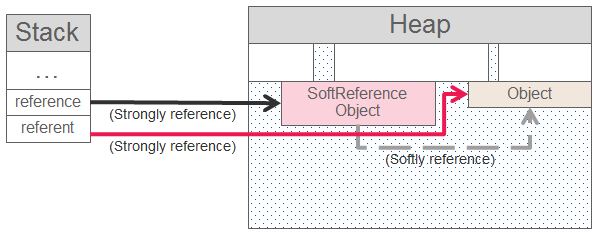 |
| Soft reachability |
When an object is softly reachable and the memory is sufficient, the garbage collector has the freedom to decide whether or not to reclaim the object during garbage collection cycles. However, it guarantees to reclaim softly reachable objects before the OutOfMemoryError is thrown. Execute the following program with heap size -Xmx5m.
List<Reference<ByteBuffer>> list = new ArrayList<>();
for (int i = 1; i <= 6; i++) {

    System.gc(); // trigger garbage collection

    // create soft reference to 1M big object
    list.add(new SoftReference<>(ByteBuffer.allocate(1000000)));

    System.out.println("----------------- Round " + i + " -----------------");
    list.forEach((ref) -> {
        System.out.println(ref + ": " + ref.get());
    });
}
As you can see from the result below, even though the garbage collection is triggered in every loop but the objects only be reclaimed when there is not enough memory to create a new object.
----------------- Round 1 -----------------
java.lang.ref.SoftReference@548c4f57: java.nio.HeapByteBuffer[pos=0 lim=1000000 cap=1000000]
----------------- Round 2 -----------------
java.lang.ref.SoftReference@548c4f57: java.nio.HeapByteBuffer[pos=0 lim=1000000 cap=1000000]
java.lang.ref.SoftReference@1218025c: java.nio.HeapByteBuffer[pos=0 lim=1000000 cap=1000000]
----------------- Round 3 -----------------
java.lang.ref.SoftReference@548c4f57: java.nio.HeapByteBuffer[pos=0 lim=1000000 cap=1000000]
java.lang.ref.SoftReference@1218025c: java.nio.HeapByteBuffer[pos=0 lim=1000000 cap=1000000]
java.lang.ref.SoftReference@816f27d: java.nio.HeapByteBuffer[pos=0 lim=1000000 cap=1000000]
----------------- Round 4 -----------------
java.lang.ref.SoftReference@548c4f57: java.nio.HeapByteBuffer[pos=0 lim=1000000 cap=1000000]
java.lang.ref.SoftReference@1218025c: java.nio.HeapByteBuffer[pos=0 lim=1000000 cap=1000000]
java.lang.ref.SoftReference@816f27d: java.nio.HeapByteBuffer[pos=0 lim=1000000 cap=1000000]
java.lang.ref.SoftReference@87aac27: java.nio.HeapByteBuffer[pos=0 lim=1000000 cap=1000000]
----------------- Round 5 -----------------
java.lang.ref.SoftReference@548c4f57: null
java.lang.ref.SoftReference@1218025c: null
java.lang.ref.SoftReference@816f27d: null
java.lang.ref.SoftReference@87aac27: null
java.lang.ref.SoftReference@3e3abc88: java.nio.HeapByteBuffer[pos=0 lim=1000000 cap=1000000]
----------------- Round 6 -----------------
java.lang.ref.SoftReference@548c4f57: null
java.lang.ref.SoftReference@1218025c: null
java.lang.ref.SoftReference@816f27d: null
java.lang.ref.SoftReference@87aac27: null
java.lang.ref.SoftReference@3e3abc88: java.nio.HeapByteBuffer[pos=0 lim=1000000 cap=1000000]
java.lang.ref.SoftReference@6ce253f1: java.nio.HeapByteBuffer[pos=0 lim=1000000 cap=1000000]
java.lang.ref.SoftReference@548c4f57: java.nio.HeapByteBuffer[pos=0 lim=1000000 cap=1000000]
----------------- Round 2 -----------------
java.lang.ref.SoftReference@548c4f57: java.nio.HeapByteBuffer[pos=0 lim=1000000 cap=1000000]
java.lang.ref.SoftReference@1218025c: java.nio.HeapByteBuffer[pos=0 lim=1000000 cap=1000000]
----------------- Round 3 -----------------
java.lang.ref.SoftReference@548c4f57: java.nio.HeapByteBuffer[pos=0 lim=1000000 cap=1000000]
java.lang.ref.SoftReference@1218025c: java.nio.HeapByteBuffer[pos=0 lim=1000000 cap=1000000]
java.lang.ref.SoftReference@816f27d: java.nio.HeapByteBuffer[pos=0 lim=1000000 cap=1000000]
----------------- Round 4 -----------------
java.lang.ref.SoftReference@548c4f57: java.nio.HeapByteBuffer[pos=0 lim=1000000 cap=1000000]
java.lang.ref.SoftReference@1218025c: java.nio.HeapByteBuffer[pos=0 lim=1000000 cap=1000000]
java.lang.ref.SoftReference@816f27d: java.nio.HeapByteBuffer[pos=0 lim=1000000 cap=1000000]
java.lang.ref.SoftReference@87aac27: java.nio.HeapByteBuffer[pos=0 lim=1000000 cap=1000000]
----------------- Round 5 -----------------
java.lang.ref.SoftReference@548c4f57: null
java.lang.ref.SoftReference@1218025c: null
java.lang.ref.SoftReference@816f27d: null
java.lang.ref.SoftReference@87aac27: null
java.lang.ref.SoftReference@3e3abc88: java.nio.HeapByteBuffer[pos=0 lim=1000000 cap=1000000]
----------------- Round 6 -----------------
java.lang.ref.SoftReference@548c4f57: null
java.lang.ref.SoftReference@1218025c: null
java.lang.ref.SoftReference@816f27d: null
java.lang.ref.SoftReference@87aac27: null
java.lang.ref.SoftReference@3e3abc88: java.nio.HeapByteBuffer[pos=0 lim=1000000 cap=1000000]
java.lang.ref.SoftReference@6ce253f1: java.nio.HeapByteBuffer[pos=0 lim=1000000 cap=1000000]
Given the characteristic of the soft reference, it can be used to implement memory sensitive cache. However, this is not the perfect solution (as per stated in SoftReference JavaDoc) as we should prevent garbage collector to reclaim recent created and recently used objects.
Weak Reference
WeakReference works similarly like SoftReference. An object is weakly reachable if it is neither strongly nor softly reachable and it can be reached by traversing the WeakReference object. As I've mentioned before, an object could have multiple references at the same time. However, the stronger reference effect always supersedes the weaker one. A weakly reachable object always be reclaimed during garbage collection cycle regardless the memory is sufficient or not. Execute the same program in the Soft Reference section with heap size -Xmx5M but this time change the reference type of big object to WeakReference.The result shows that every newly created weakly reachable object was always reclaimed during garbage collection cycle in every loop.
----------------- Round 1 -----------------
java.lang.ref.WeakReference@548c4f57: null
----------------- Round 2 -----------------
java.lang.ref.WeakReference@548c4f57: null
java.lang.ref.WeakReference@1218025c: java.nio.HeapByteBuffer[pos=0 lim=1000000 cap=1000000]
----------------- Round 3 -----------------
java.lang.ref.WeakReference@548c4f57: null
java.lang.ref.WeakReference@1218025c: null
java.lang.ref.WeakReference@816f27d: java.nio.HeapByteBuffer[pos=0 lim=1000000 cap=1000000]
----------------- Round 4 -----------------
java.lang.ref.WeakReference@548c4f57: null
java.lang.ref.WeakReference@1218025c: null
java.lang.ref.WeakReference@816f27d: null
java.lang.ref.WeakReference@87aac27: java.nio.HeapByteBuffer[pos=0 lim=1000000 cap=1000000]
----------------- Round 5 -----------------
java.lang.ref.WeakReference@548c4f57: null
java.lang.ref.WeakReference@1218025c: null
java.lang.ref.WeakReference@816f27d: null
java.lang.ref.WeakReference@87aac27: null
java.lang.ref.WeakReference@3e3abc88: java.nio.HeapByteBuffer[pos=0 lim=1000000 cap=1000000]
----------------- Round 6 -----------------
java.lang.ref.WeakReference@548c4f57: null
java.lang.ref.WeakReference@1218025c: null
java.lang.ref.WeakReference@816f27d: null
java.lang.ref.WeakReference@87aac27: null
java.lang.ref.WeakReference@3e3abc88: null
java.lang.ref.WeakReference@6ce253f1: java.nio.HeapByteBuffer[pos=0 lim=1000000 cap=1000000]
java.lang.ref.WeakReference@548c4f57: null
----------------- Round 2 -----------------
java.lang.ref.WeakReference@548c4f57: null
java.lang.ref.WeakReference@1218025c: java.nio.HeapByteBuffer[pos=0 lim=1000000 cap=1000000]
----------------- Round 3 -----------------
java.lang.ref.WeakReference@548c4f57: null
java.lang.ref.WeakReference@1218025c: null
java.lang.ref.WeakReference@816f27d: java.nio.HeapByteBuffer[pos=0 lim=1000000 cap=1000000]
----------------- Round 4 -----------------
java.lang.ref.WeakReference@548c4f57: null
java.lang.ref.WeakReference@1218025c: null
java.lang.ref.WeakReference@816f27d: null
java.lang.ref.WeakReference@87aac27: java.nio.HeapByteBuffer[pos=0 lim=1000000 cap=1000000]
----------------- Round 5 -----------------
java.lang.ref.WeakReference@548c4f57: null
java.lang.ref.WeakReference@1218025c: null
java.lang.ref.WeakReference@816f27d: null
java.lang.ref.WeakReference@87aac27: null
java.lang.ref.WeakReference@3e3abc88: java.nio.HeapByteBuffer[pos=0 lim=1000000 cap=1000000]
----------------- Round 6 -----------------
java.lang.ref.WeakReference@548c4f57: null
java.lang.ref.WeakReference@1218025c: null
java.lang.ref.WeakReference@816f27d: null
java.lang.ref.WeakReference@87aac27: null
java.lang.ref.WeakReference@3e3abc88: null
java.lang.ref.WeakReference@6ce253f1: java.nio.HeapByteBuffer[pos=0 lim=1000000 cap=1000000]
The weak reference can be used to prevent the memory leak of a program written in listener or observer pattern. When the Subject has a life span longer than the Observer we need a way to remove the out of scope observers. The appropriate approach is to explicitly unregister (unreference) the observers when they go out of scope. However, this requires the programmer awareness to do so. Failure of unregistering the out of scope observers will not cause any immediate error impact and the program still can run successfully as long as the memory is sufficient. However, in long run, the subject keeps accumulating (strongly referenced) un-used observers and could end up one day exhaust the memory and hit the OutOfMemoryError.
Given the TaskAgent class as Subject.
// TaskAgent as Subject
public class TaskAgent {

    private List<ITaskListener> taskListeners = new ArrayList<>();

    public void registerTaskListener(ITaskListener taskListener) {
        taskListeners.add(taskListener);
    }

    public void acceptTask(String task) {
        taskListeners.forEach((taskListener -> taskListener.doWork(task)));
    }

    public void unregisterTaskListener(ITaskListener taskListener) {
        taskListeners.remove(taskListener);
    }
}
The Worker class as Obverser to react when TaskAgent accepts new task. Noted that a 1M ByteBuffer object is added to the worker object in order to simulate the OutOfMemoryError if worker objects failed to be reclaimed.
public interface ITaskListener {
    void doWork(String task);
}

// Worker as Observer
public class Worker implements ITaskListener {

    private String name;

    // to simulate OutOfMemoryError
    private ByteBuffer bb = ByteBuffer.allocate(1000000);

    public Worker(final String name) {
        this.name = name;
    }

    @Override
    public void doWork(final String task) {
        System.out.println(name + " is working on " + task);
    }
}
The App class for execution.
public class App {

    public static void main(String[] args) {

        TaskAgent agent = new TaskAgent();

        int i = 1;
        while (true) {
            System.gc();
            Worker worker = new Worker("worker" + i);
            agent.registerTaskListener(worker);
            agent.acceptTask("task" + i);
            System.out.println("-------");
            agent.unregisterTaskListener(worker);
            i++;
        }
    }
}
In the App above, task agent has a long life span but each worker only live within a while-loop iteration scope. When the worker goes out of scope it becomes un-used and should be cleared by the garbage collector in the beginning of next iteration. Execute the App with -Xmx3M, the App can run endlessly. However, if we comment the unregisterTaskListener() method, we will hit the OutOfMemoryError in a couple of iterations as below.
worker1 is working on task1
-------
worker1 is working on task2
worker2 is working on task2
-------
Exception in thread "main" java.lang.OutOfMemoryError: Java heap space
-------
worker1 is working on task2
worker2 is working on task2
-------
Exception in thread "main" java.lang.OutOfMemoryError: Java heap space
To achieve the same result as per explicitly unregisterTaskListener(), we can make use of weak reference in TaskAgent as below.
public class TaskAgent {

    private List<WeakReference<ITaskListener>> weakRefTaskListeners = new ArrayList<>();

    public void registerTaskListener(ITaskListener taskListener) {
        weakRefTaskListeners.add(new WeakReference<ITaskListener>(taskListener));
    }

    public void acceptTask(String task) {
        for (Iterator<WeakReference<ITaskListener>> iter = weakRefTaskListeners.iterator(); iter.hasNext();) {
            WeakReference<ITaskListener> weakRef = iter.next();
            ITaskListener taskListener = weakRef.get();
            if (taskListener != null) {
                taskListener.doWork(task);
            } else {
                iter.remove();
            }
        }
    }

    // remain this method for explicitly unregister worker
    public void unregisterTaskListener(ITaskListener taskListener) {
        for (Iterator<WeakReference<ITaskListener>> iter = weakRefTaskListeners.iterator(); iter.hasNext(); ) {
            WeakReference<ITaskListener> weakRef =  iter.next();
            if (taskListener == weakRef.get()) {
                iter.remove();
                break;
            }
        }
    }
}
In this case, if the programmer forgets or not aware of explicit call the unregisterTaskListener(), the App still can run endlessly.
Another usage of WeakReference is to associate two objects where one object's lifespan is tightly coupled with another object's lifespan. The reason probably because of the relationship of these 2 objects is rare and temporary hence not worth to introduce and maintain a new class just to bind them together. We can do this by using WeakHashMap, a map with weak keys which do not prevent themselves to be reclaimed when their referent objects become weakly reachable. When keys are discarded by the garbage collector, the corresponding map entries will also be cleared automatically. Below is an example of mapping of Animal object and Image object.
public class App {

    public static void main(String[] args) {

        Animal cow = new Animal("cow");

        Map<Animal, Image> map = new WeakHashMap<>();
        map.put(cow, new BufferedImage(10, 10, 10));

        System.out.println(map.get(cow) != null); // true

        System.gc();
        System.out.println(map.get(cow) != null); // true

        cow = null; // "cow" object goes out of scope
        System.gc();
        for (Map.Entry<Animal, Image> entry : map.entrySet()) {
            System.out.println("never reach this point");
        }
    }
}

class Animal {

    String name;

    public Animal(final String name) {
        this.name = name;
    }

    @Override
    public boolean equals(final Object o) {
        if (this == o) return true;
        if (o == null || getClass() != o.getClass()) return false;

        Animal animal = (Animal) o;

        return name.equals(animal.name);
    }

    @Override
    public int hashCode() {
        return name.hashCode();
    }
}
Phantom Reference and Reference Queue
It is confusing if we try to understand phantom reference by making a analogy of how we make use of soft and weak reference. While the phantom reference belong to the Reference family, but its function is quite different than the soft and weak reference. An object is phantom reachable if it is neither strongly, softly nor weakly reachable, it has been finalized and there is a phantom reference refers to it. When an object becomes phantom reachable, that's mean it has been finalized and we has no chance to get back the same object again. In fact, PhantomReference implementation always return null when we invoke get() method even though the referent object is currently being strongly referenced. So, what the phantom reference can do in this case? Working in conjunction with ReferenceQueue, phantom reference can be a better choice of scheduling cleanup action instead of using Java finalization mechanism.A phantom reference object need to be registered to a reference queue. When its referent object is finalized, the garbage collector will append the phantom reference object onto the reference queue. The ReferenceQueue provides methods such as poll() (non-blocking) and remove() (blocking) which allow the caller to examine if the referent object has been finalized. If yes, then proceed with the cleanup action. By doing this, it is the caller thread responsibility to make sure the cleanup action take place. This is more flexible, reliable, and predictive compare to relying on Finalizer daemon thread to do the same thing.
The reference queue is not particularly used for phantom reference only. It can be used with soft and weak reference as well. However, the timing when the garbage collector enqueues the soft/weak reference objects and phantom reference objects are different. The timing when phantom references objects are enqueued is after the referent object is finalized. But the timing when soft and weak reference objects are enqueued is when the referent objects are marked as finalizable. Technically, that is mean we still can obtain or even "resurrect" the dying referent objects by creating new strong references to them at the finalization stage. This will never happen in using phantom references because the referent objects has passed the finalization stage. Moreover, you will never able to get the referent object from a phantom reference object.
 |
| Timing to enqueue reference objects into reference queue |
The phantom reference has a special behavior that we need to pay attention with. As per stated in JavaDoc,
"Unlike soft and weak references, phantom references are not automatically cleared by the garbage collector as they are enqueued. An object that is reachable via phantom references will remain so until all such references are cleared or themselves become unreachable."Meaning we must explicitly clear the phantom reference objects as well as the reference queue object in order for the garbage collector to fully reclaim the referent objects. In the following program (which run with -Xmx5M), I try to load a new 4M big object only after the previous big object is totally gone.
public class App {
    public static void main(String[] args) {

        ByteBuffer bb = ByteBuffer.allocate(2000000);
        ReferenceQueue queue = new ReferenceQueue();
        PhantomReference<ByteBuffer> pr = new PhantomReference<>(bb, queue);

        bb = null; // remove strong reference of big object
        System.gc(); // reclaim the big object

        try {
            Reference ref = queue.remove(2000);
            if (ref == pr) {
//                ref = null;
//                pr = null;
                System.out.println("Finalized...");
            } else {
                System.err.println("Cannot be finalized..");
            }
        } catch (InterruptedException e) {
        }

        ByteBuffer.allocate(2000000); // create new big object
    }
}
The program hits out of memory error when reach the line of creating new big object. There are 2 ways to resolve this.
First is to explicitly de-reference the phantom reference object and reference queue object by assigning null to them. The program can run successfully by un-commeting the commented null assignment lines.
Second is to change the reference type to weak reference. However, we have to make sure we don't implement object finalizer which could eventually prevent the object from being reclaimed. I am not sure why there is no auto clearing in phantom reference. According to the answer in this stackoverflow, auto clearing for phantom reference will be in place in Java 9.
References:
https://docs.oracle.com/javase/7/docs/api/java/lang/ref/package-summary.html
http://stackoverflow.com/questions/41396051/phantomreference-with-null-queue
https://community.oracle.com/blogs/enicholas/2006/05/04/understanding-weak-references
http://www.kdgregory.com/?page=java.refobj
